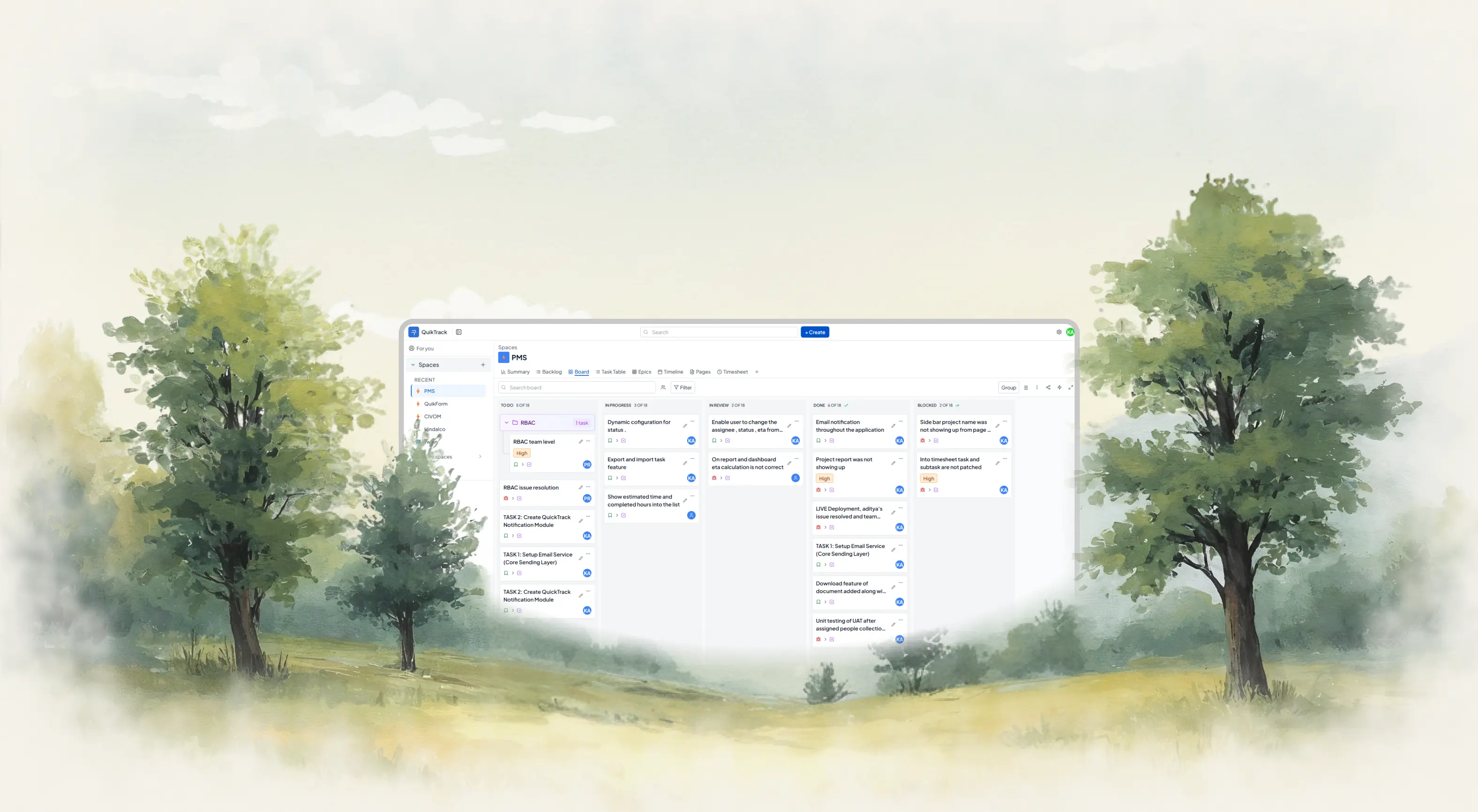
Project Task and Time Tracking
Software for Modern Teams.

Plan sprints, assign epics, log timesheets, and track real effort against estimates — all in one system without the tool-switching.

The problem

Your sprint tool and timesheet
don't talk to each other.

Most teams plan sprints in Jira, log time in Toggl, and build reports in spreadsheets. By the time leadership sees the data, the sprint is already off track.

📋
Sprints in one tool, timesheets in another
You run your backlog in Jira or ClickUp, but timesheets live in Harvest or Toggl. Nothing links back to the actual task or epic.
Overruns show up after the sprint ends
By the time you know a task has blown past its estimate, it's already too late to replan, rebalance, or reassign.
📉
Project dashboards are always out of date
Status reports are assembled manually from three different tools. They're stale before they're shared with leadership.
⚠ No time data linked to tasks
No task link
Missing entries
⚠ 12 hours unlogged this week
Copying from Jira...
Pasting into spreadsheet...
!!! Already outdated — meeting in 10 mins
The solution

One system for sprints, tasks, and timesheets.

QuikTrack is project task and time tracking software that keeps your Gantt chart, sprint backlog, and timesheets in sync — with zero manual reporting.

📝
Plan
Set epics, sprints and estimates
⚙️
Execute
Work from backlog or Gantt
Track
Log timesheets on tasks
📊
Analyze
Planned vs actual effort
🚀
Improve
Sharper estimates next sprint
🔗
Tasks and Timesheets in Sync
Log time directly on a task or epic. Every sprint's effort links automatically to your timesheet — no copy-paste, no gaps.
👁
Real-Time Project Visibility
See sprint progress, task ownership, and Gantt timelines in real time. No follow-up meetings to find out what's happening.
📐
Planned vs. Actual Effort
Compare estimated hours against logged time on every task, epic, and sprint. Catch overruns before they derail delivery.
Zero Setup
Start planning sprints on Day 1. Predefined structure means no configuration. Import from Jira or start fresh in minutes.
Features

Everything your team needs to
plan, track, and deliver.

Built for teams that run sprints and need real visibility into how effort maps to results.

📌
Work Management
Organise work into epics, sprints, and tasks — with Kanban, Gantt, backlog, and list views your team will actually use.
  • Epics, sprints, and subtasks
  • Kanban, Gantt, and backlog views
  • Priorities, due dates, and assignees
  • Agile and Scrum-ready workflows
📊
Project Dashboards
Real-time dashboards with sprint progress, effort insights, and team performance — no manual assembly required.
  • Sprint velocity and progress
  • Planned vs. actual effort view
  • Per-member performance tracking
  • Export to PDF and CSV
👥
Resource Visibility
See team workload, sprint capacity, and individual utilisation before you assign work — not after the sprint is overloaded.
  • Workload view by team member
  • Sprint capacity planning
  • Utilisation and availability
  • Absence and leave tracking
🤖
AI Execution Assistant
QuikTrack AI flags overrun tasks, predicts delivery risk, and writes sprint retrospective summaries automatically.
  • Overrun detection and alerts
  • Delivery risk prediction
  • Auto-drafted sprint retrospectives
  • AI status update generation
🔗
Integrations and API
Connect to Jira, Slack, GitHub, and more — or replace them with everything built into QuikTrack.
  • Jira, GitHub, Slack, Figma
  • Google Calendar sync
  • REST API and webhooks
  • Import from Notion and Trello
How it works

From backlog to delivery.
Every hour accounted for.

QuikTrack connects your sprint planning, task execution, and timesheet reporting into one continuous loop — so nothing falls through the gaps.

📝
1
Sprint Planned
Epics broken into tasks with estimates
⚙️
2
Work Assigned
Team picks from backlog or Gantt
3
Time Logged
Inline timesheet, real-time sync
🤖
4
AI Monitors
Flags overruns and sprint risk
📊
5
Report Ready
Dashboard live, retrospective drafted
QuikTrack AI
Watches every sprint in real time. Flags overrun tasks, predicts delivery risk, and generates retrospective summaries so your team spends less time in status meetings.
Overrun detection
Sprint risk alerts
Auto retrospectives
Timesheet insights
Capacity forecasting
2×
Faster sprint delivery for teams using QuikTrack's unified task and timesheet system
84%
Reduction in time spent on manual status reporting across sprints and projects
0
Configuration required — teams are planning sprints and logging time on Day 1
8k+
Teams actively tracking epics, tasks, and timesheets together in QuikTrack
Integrations

Connects to your whole project stack.

Sync QuikTrack with the tools your team already uses — or bring everything into one place and ditch the tab-switching.

🗂️
Jira
💬
Slack
🐙
GitHub
🎨
Figma
📅
Google Calendar
📋
Notion
Zapier
🔗
Trello
🎥
Zoom
📊
Linear
🗂️
Jira
💬
Slack
🐙
GitHub
🎨
Figma
📅
Google Calendar
📋
Notion
Zapier
🔗
Trello
🎥
Zoom
📊
Linear
📤
Outlook
🌐
Webflow
🤝
Asana
📈
Stripe
🔔
ClickUp
🔍
Confluence
🕐
Harvest
Toggl
📊
Mixpanel
🔧
Monday.com
📤
Outlook
🌐
Webflow
🤝
Asana
📈
Stripe
🔔
ClickUp
🔍
Confluence
🕐
Harvest
Toggl
📊
Mixpanel
🔧
Monday.com

Here's what teams are saying.

We stopped using Jira + Toggl together. QuikTrack replaces both and the time-to-task link means our reports write themselves. Saved us 6 hours a week easily.

Tanvir Malik
Tanvir Malik
Engineering Lead, Stacklio

The overrun detection alone is worth it. We used to find out about budget blowouts after the fact. Now we get flagged mid-sprint and can actually do something about it.

Neha Kapoor
Neha Kapoor
Project Manager, Orbis Digital

Zero setup is real. We had the whole team using it on day one. No training, no configuration, no admin nightmare. It just works the way you'd expect it to.

Aditya Rao
Aditya Rao
COO, FlowLabs Inc.

We stopped using Jira + Toggl together. QuikTrack replaces both and the time-to-task link means our reports write themselves. Saved us 6 hours a week easily.

Tanvir Malik
Tanvir Malik
Engineering Lead, Stacklio

The overrun detection alone is worth it. We used to find out about budget blowouts after the fact. Now we get flagged mid-sprint and can actually do something about it.

Neha Kapoor
Neha Kapoor
Project Manager, Orbis Digital

Zero setup is real. We had the whole team using it on day one. No training, no configuration, no admin nightmare. It just works the way you'd expect it to.

Aditya Rao
Aditya Rao
COO, FlowLabs Inc.

Zero setup is real. We had the whole team using it on day one. No training, no configuration, no admin nightmare. It just works the way you'd expect it to.

Aditya Rao
Aditya Rao
COO, FlowLabs Inc.

We stopped using Jira + Toggl together. QuikTrack replaces both and the time-to-task link means our reports write themselves. Saved us 6 hours a week easily.

Tanvir Malik
Tanvir Malik
Engineering Lead, Stacklio

The overrun detection alone is worth it. We used to find out about budget blowouts after the fact. Now we get flagged mid-sprint and can actually do something about it.

Neha Kapoor
Neha Kapoor
Project Manager, Orbis Digital

Zero setup is real. We had the whole team using it on day one. No training, no configuration, no admin nightmare. It just works the way you'd expect it to.

Aditya Rao
Aditya Rao
COO, FlowLabs Inc.

We stopped using Jira + Toggl together. QuikTrack replaces both and the time-to-task link means our reports write themselves. Saved us 6 hours a week easily.

Tanvir Malik
Tanvir Malik
Engineering Lead, Stacklio

The overrun detection alone is worth it. We used to find out about budget blowouts after the fact. Now we get flagged mid-sprint and can actually do something about it.

Neha Kapoor
Neha Kapoor
Project Manager, Orbis Digital

The overrun detection alone is worth it. We used to find out about budget blowouts after the fact. Now we get flagged mid-sprint and can actually do something about it.

Neha Kapoor
Neha Kapoor
Project Manager, Orbis Digital

Zero setup is real. We had the whole team using it on day one. No training, no configuration, no admin nightmare. It just works the way you'd expect it to.

Aditya Rao
Aditya Rao
COO, FlowLabs Inc.

We stopped using Jira + Toggl together. QuikTrack replaces both and the time-to-task link means our reports write themselves. Saved us 6 hours a week easily.

Tanvir Malik
Tanvir Malik
Engineering Lead, Stacklio

The overrun detection alone is worth it. We used to find out about budget blowouts after the fact. Now we get flagged mid-sprint and can actually do something about it.

Neha Kapoor
Neha Kapoor
Project Manager, Orbis Digital

Zero setup is real. We had the whole team using it on day one. No training, no configuration, no admin nightmare. It just works the way you'd expect it to.

Aditya Rao
Aditya Rao
COO, FlowLabs Inc.

We stopped using Jira + Toggl together. QuikTrack replaces both and the time-to-task link means our reports write themselves. Saved us 6 hours a week easily.

Tanvir Malik
Tanvir Malik
Engineering Lead, Stacklio

Frequently asked questions

Everything you need to know about QuikTrack — from setup to billing to how the AI works.

Ask a question
What is project task and time tracking software?
It's a platform that connects sprint planning, task management, and timesheet logging in one system. Instead of running Jira for tasks and Toggl for time, everything links automatically — so planned effort and actual hours are always in sync.
Does QuikTrack support sprints, epics, and Agile workflows?+
Yes. QuikTrack supports sprint planning, backlog management, epic tracking, Kanban boards, Gantt charts, and sprint retrospectives. AI-generated retrospective summaries save your team hours after each sprint.
How do timesheets work in QuikTrack?+
Time logging happens inline on each task — a one-click timer or manual entry right where the work is. Timesheets generate automatically from logged hours. No separate time entry needed at the end of the week.
How does overrun tracking work?+
QuikTrack AI compares logged time against each task's estimate in real time. When actual effort exceeds the estimate, the system flags the task and notifies the project manager automatically — so you can act mid-sprint, not after it ends.
Can I see planned vs. actual effort by sprint?+
Yes. The project dashboard breaks down estimated vs. logged hours by task, epic, team member, and sprint. You get a clear view of where effort went and what to plan differently next time.
Is there really zero setup?+
Yes. You can create a project, set up a sprint backlog, assign epics, and start logging time within minutes. No admin configuration or onboarding required. Teams are typically running on Day 1.
Can I import from Jira, Notion, or Trello?+
Yes. QuikTrack supports one-click import from Jira, Trello, Notion, Asana, and CSV. Your tasks, assignees, and due dates come across cleanly — no manual re-entry needed.
Is QuikTrack part of the Quikit platform?+
Yes. QuikTrack is one of 11 connected apps in the Quikit platform. Project data links directly to QuikCRM for client management, QuikScale for goal tracking, and QuikSocial for team communication.